Through website work I’m doing I look at California Highway Patrol data and recently noticed an Apple Emergency SOS alert that was placed and found the content of the messaging interesting and offers some insight into how this system works in a real emergency.
[22:40:00 GMT-08:00 07 JAN 2023] (▪▪▪) ▪▪▪-▪▪▪▪: A USER IS REQUESTING EMERGENCY SERVICES FROM AN APPLE DEVICE VIA SATELLITE. TRANSMIT AND RECEIVE TIMES MAY BE LONGER THAN FOR CELLULAR SMS. USER RESPONSES MAY BE DELAYED DUE TO SATELLITE MOVEMENTS.THE USER CANNOT MAKE OR RECEIVE A VOICE CALL BECAUSE THEY ARE OUTSIDE CELLULAR COVERAGE.AT 06:39AM UTC, M▪▪▪▪▪ F▪▪▪▪ REQUESTED EMERGENCY SERVICES NEAR THESE COORDINATES: LATITUDE 40.7963 (N), LONGITUDE -123.4074 (W).[22:40:00 GMT-08:00 07 JAN 2023] (▪▪▪) ▪▪▪-▪▪▪: RESPONDERS MAY NEED TO SEARCH AN AREA EXTENDING AT LEAST 20 METERS IN ALL DIRECTIONS FOR A 95% CHANCE OF FINDING THE USER.THE USERS ESTIMATED ALTITUDE (HAE) IS 354 METERS. RESPONDERS MAY NEED TO SEARCH 20 METERS ABOVE AND BELOW THIS LEVEL FOR A 95% CHANCE OF FINDING THE USER.THE USER HAS CACHED ENHANCED EMERGENCY DATA WITH APPLE. QUERY ADDITIONAL DATA!THE USERS DEVICE BATTERY STATE IS 61-100%. THEIR VERIFIED PHONE NUMBER IS +1▪▪▪▪▪▪▪▪▪▪.THE USER REQUESTS HELP WITH A FIRE EMERGENCY.[22:40:00 GMT-08:00 07 JAN 2023] (▪▪▪) ▪▪▪-▪▪▪▪: THIS REQUEST IS FOR ME.NO ONE IS ON FIRE.NO ONE IS TRAPPED.THE SPECIFIC EMERGENCY IS A OTHER FIRE. THE USER DESCRIBES THE SPECIFIC EMERGENCY AS FOLLOWS: CAMPER ROLLING SMOKE FIRE THE USERS IPHONE HAS ITS REGION SET TO UNITED STATES. THE USERS IPHONE HAS ITS DEFAULT LANGUAGE SET TO ENGLISH. TCC OR PSAP SYSTEMS MAY GARBLE THIS LANGUAGES SCRIPT. RETURN MESSAGES TO THE USER WILL NOT BE GARBLED. THIS CONCLUDES THE INITIAL DATA. TWO-WAY TEXT WITH THE USER IS NOW AVAILABLE.[22:41:00 GMT-08:00 07 JAN 2023] K▪▪▪ M▪▪▪▪▪▪ HAS ENTERED THE CHAT[22:41:00 GMT-08:00 07 JAN 2023] K▪▪▪ M▪▪▪▪▪▪: WHAT IS ON FIRE CALL INITIATED: 22:39:59 GMT-08:00 07 JAN 2023 PHONE NUMBER: (▪▪▪) ▪▪▪-▪▪▪▪
With the imminent demise of Google Analytics Universal in July 2023 I’ve been searching for an alternative and found an Open Source project from Plausible.io. Slight warning, this post is largely for myself to remember what I did to get this going so YMMV.
I host a few sites on Amazon Lightsail and while I found a few great posts discussing self-hosting of Plausible I found these setups perhaps a bit more complicated that I think it needed to be. For example, Lightsail has instances that include both a web server and Bitnami’s Let’s Encrypt SSL tool already installed so starting from an OS-only instance type requires some unnecessary configuration.
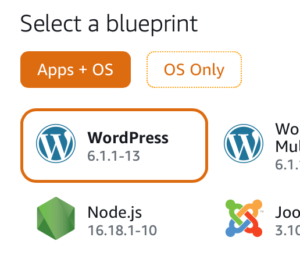
To get started quickly browse to the Amazon Lightsail console and under Apps + OS select the NodeJS instance using Debian (as of this writing Feb 2023). You could use and “OS Only” option but then you’d be left installing a number of packages vs. using this pre-built instance.
You’ll want to setup a static IP address for this instance for your DNS entry (see below). Next, SSH into your instance and create an “apps” folder under /opt/bitnami:
NOTE: I added DISABLE_REGISTRATION as I’m the only user who needs access.
I use Cloudflare for my CDN/DNS and I created an A NAME DNS-only entry pointing to analytics.<domain>.com which I use for Plausible.
Next, again following the self-hosting guide I started up the server using docker-compose:
$ sudo docker-compose up -d
The docs weren’t super clear about getting the first user created but browse to your URL and register the first user directly on the site. Following that I would recommend disabling registrations in the plausible-conf.env using:
Finally, setup your Apache virtual host config by copying the existing sample HTTPS configuration:
$ cd /opt/bitnami/apache/conf/vhosts
$ sudo cp sample-https-vhost.conf.disabled plausible-https-vhost.conf
Here’s my Apache vhost file for Plausible (using X-Robots-Tag to prevent crawling):
<VirtualHost 127.0.0.1:443 _default_:443>
  ServerName analytics.<domain>.com
  ServerAlias *
  SSLEngine on
  Header Set X-Robots-Tag "noindex, noarchive, nosnippet"
  SSLCertificateFile "/opt/bitnami/apache/conf/analytics.<domain>.com.crt"
  SSLCertificateKeyFile "/opt/bitnami/apache/conf/analytics.<domain>.com.key"
  DocumentRoot /opt/bitnami/apps/plausible
  # BEGIN: Configuration for letsencrypt
  Include "/opt/bitnami/apps/letsencrypt/conf/httpd-prefix.conf"
  # END: Configuration for letsencrypt
  # BEGIN: Support domain renewal when using mod_proxy without Location
  <IfModule mod_proxy.c>
    ProxyPass /.well-known !
  </IfModule>
  # END: Support domain renewal when using mod_proxy without Location
  <Directory "/opt/bitnami/apps/plausible">
    Options -Indexes +FollowSymLinks -MultiViews
    AllowOverride All
    Require all granted
  </Directory>
  ProxyPass / http://localhost:8000/
  ProxyPassReverse / http://localhost:8000/
  # BEGIN: Support domain renewal when using mod_proxy within Location
  <Location /.well-known>
    <IfModule mod_proxy.c>
      ProxyPass !
    </IfModule>
  </Location>
  # END: Support domain renewal when using mod_proxy within Location
</VirtualHost>
Following this suggestion, in /opt/bitnami/apps/plausible I created a robots.txt file with the following. Note, need to allow /js/ to allow crawling to work correctly for pages using Plausible:
User-agent: *
Allow: /js/
Disallow: /
I then updated the docker-compose.yaml adding a volumes mapping to this local file under the plausible service.
Lastly, restarted both Plausible and Apache and you should be well on your way to getting your Google Analytics alternative running.
$ sudo docker-compose down --remove-orphans && sudo docker-compose up -d
$ sudo /opt/bitnami/ctlscript.sh restart apache
All in all, the above took me less than a hour to get a working instance of Plausible.io up and running, self-hosted for $20/month on a 4GB Lightsail instance.
So far, I’ve been running this instance for 6 days and it looks pretty good. I’m getting a 500 error trying to import my old GA data so not quite sure what’s going on there but I did manage to get Google Search Console enabled but I’m not see where that data might show up. I’ve also setup email reporting and I’m curious to see what those look like.
Lastly, this project lives on its paid subscriptions to its cloud hosted version and assuming it works out I’ll be sure to use their sponsorship page.